Lumma Stealer Research Analysis
This report is an analysis of the information mentioned in this blog post
I will start with Execution & Evasion Techniques: I have picked the methods that I found interesting the most. Starting with obfuscation it uses Low-Level Virtual Machine (LLVM), trigonometry to track mouse movements.
1. Low Level Virtual Machine (LLVM)
LLVM is an infrastructure that was created to optimize code at compile time. Its main use is to make different programming languages allowing them to share tools before they are converted to machine code.
This process can be done in three steps, the compiler has three parts:
- Frontend: Parses the source code and converts it into Intermediate Representation (IR) - a form of syntax that is closest to hardware.
- Middle end: Analyzes this IR and optimizes it.
- Backend: Converts the IR into machine code.

LLVM Compiler Architecture
LLVM makes writing new programming languages easier.
Malware Abuse of LLVM
Malware authors can abuse this functionality by:
- Reconstructing the program control flow
- Making an If-else statement look like a loop or switch statement
- Reconstructing instructions into mathematical equivalent forms
- Injecting useless code or dead code that does not affect or add anything to the program but makes it complex
2. Trigonometry to Track Mouse Movements
In the blog, it's mentioned that Lumma Stealer uses this technique for sandbox evasion. It utilizes trigonometry to track mouse movements to escape sandbox. It would not execute the payload unless human activity was detected.
I have done my own research to figure this method and test it myself.
Windows API Functions Used
A. Mouse Tracking Functions
| Function | Library | Purpose |
|---|---|---|
GetCursorPos() |
user32.dll |
Retrieves the current mouse cursor position (x, y) |
GetSystemMetrics(SM_MOUSEPRESENT) |
user32.dll |
Checks if a physical mouse is connected (anti-VM check) |
GetAsyncKeyState(VK_ESCAPE) |
user32.dll |
Detects if the ESC key is pressed (for graceful exit) |
B. Timing Functions
| Function | Library | Purpose |
|---|---|---|
Sleep() |
kernel32.dll |
Pauses execution to control sampling rate |
std::chrono (C++) |
Standard Library | High-precision timing for movement analysis |
The Mathematical Logic Behind It
A. Calculating Movement Angle
The program computes the angle between two consecutive mouse positions using atan2 (arctangent of dy/dx):
double calculateMovementAngle(POINT from, POINT to) {
    double dx = to.x - from.x;
    double dy = to.y - from.y;
    return radiansToDegrees(atan2(dy, dx)); // converts to degrees (0-360)
}dxanddy- Differences in x and y coordinatesatan2(dy, dx)- Computes the angle in radiansradiansToDegrees()- Converts to degrees for easier interpretation
B. Normalizing Angle Differences
Since angles wrap around (0 = 360), we normalize them to ensure correct comparisons:
double normalizeAngle(double angle) {
    angle = fmod(angle, 360.0); // ensures angle is within 0-360
    if (angle < 0) angle += 360.0;
    return angle;
}
C. Determining Human vs. Bot Movement
The program checks if angle changes exceed a threshold (45 by default):
double angleDifference(double a, double b) {
    double diff = fabs(normalizeAngle(a) - normalizeAngle(b));
    return fmin(diff, 360.0 - diff); // get smallest difference (accounts for wrap-around)
}- Human movements: Large angle variations (>45°)
- Bot/sandbox movements: Small angle variations (straight lines, repetitive patterns)
The Program Flow
- It checks the mouse presence using
GetSystemMetrics(SM_MOUSEPRESENT)to see whether the mouse is connected - Then sample mouse positions - Every 100ms, it records the cursor position using
GetCursorPos() - Store and Analyze Angles - Maintains a sliding window of the last 10 angles
- Determine Human vs. Bot: average angle change > 45 Human detected. If the average angle change ≤ 45 Bot
Code Sample
#define _USE_MATH_DEFINES
#include <Windows.h>
#include <cmath>
#include <iostream>
#include <vector>
#include <chrono>

// Constants
constexpr int SAMPLE_INTERVAL_MS = 100;  // Time between mouse position samples
constexpr double ANGLE_THRESHOLD = 45.0; // Degrees difference to consider human-like
constexpr int MIN_SAMPLES = 5;           // Minimum samples before making determination
constexpr int DETECTION_WINDOW = 10;     // Number of recent samples to consider

// Converts radians to degrees
inline double radiansToDegrees(double radians) {
    return radians * (180.0 / M_PI);
}

double calculateMovementAngle(POINT from, POINT to) {
    double dx = to.x - from.x;
    double dy = to.y - from.y;
    return radiansToDegrees(atan2(dy, dx));
}

double normalizeAngle(double angle) {
    angle = fmod(angle, 360.0);
    if (angle < 0) angle += 360.0;
    return angle;
}

double angleDifference(double a, double b) {
    double diff = fabs(normalizeAngle(a) - normalizeAngle(b));
    return fmin(diff, 360.0 - diff);
}

int main() {
    std::vector<double> angleHistory;
    POINT prevPos, currentPos;
    bool mousePresent = GetSystemMetrics(SM_MOUSEPRESENT);

    if (!mousePresent) {
        std::cout << "[!] No mouse detected - likely a virtual machine or sandbox\n";
        return 1;
    }

    std::cout << "Mouse movement analysis started. Move your mouse naturally...\n";
    std::cout << "Waiting for " << MIN_SAMPLES << " samples before analysis...\n";

    //get the mouse position
    GetCursorPos(&prevPos);
    auto lastSampleTime = std::chrono::steady_clock::now();

    while (true) {
        auto now = std::chrono::steady_clock::now();
        auto elapsed = std::chrono::duration_cast<std::chrono::milliseconds>(now - lastSampleTime).count();

        if (elapsed >= SAMPLE_INTERVAL_MS) {
            GetCursorPos(¤tPos);

            // Only process if mouse has moved and keep only recent samples
            if (currentPos.x != prevPos.x || currentPos.y != prevPos.y) {
                double angle = calculateMovementAngle(prevPos, currentPos);
                angleHistory.push_back(angle);

                if (angleHistory.size() > DETECTION_WINDOW) {
                    angleHistory.erase(angleHistory.begin());
                }

                if (angleHistory.size() >= MIN_SAMPLES) {
                    double totalDiff = 0.0;
                    int comparisons = 0;

                    for (size_t i = 1; i < angleHistory.size(); i++) {
                        double diff = angleDifference(angleHistory[i], angleHistory[i-1]);
                        totalDiff += diff;
                        comparisons++;
                    }

                    double avgDiff = totalDiff / comparisons;
                    bool isHuman = avgDiff > ANGLE_THRESHOLD;

                    system("cls");
                    std::cout << "mouse movement analysis\n";
                    std::cout << "-----------------------\n";
                    std::cout << "samples collected: " << angleHistory.size() << "\n";
                    std::cout << "average angle change: " << avgDiff << " degrees\n";
                    std::cout << "detection threshold: " << ANGLE_THRESHOLD << " degrees\n";
                    std::cout << "conclusion: " << (isHuman ? "HUMAN" : "BOT/AUTOMATED") << "\n";
                    std::cout << "\nKeep moving mouse to update analysis...\n";
                }

                prevPos = currentPos;
            }

            lastSampleTime = now;
        }

        // Check for ESC key to exit
        if (GetAsyncKeyState(VK_ESCAPE) & 0x8000) {
            break;
        }

        Sleep(10);
    }

    return 0;
}
Compilation and Testing
I have compiled this using Visual Studio command line:
MouseAnalysis.cpp /EHsc /Fe:MouseAnalysis.exe /link user32.libThen run the program with the following output:
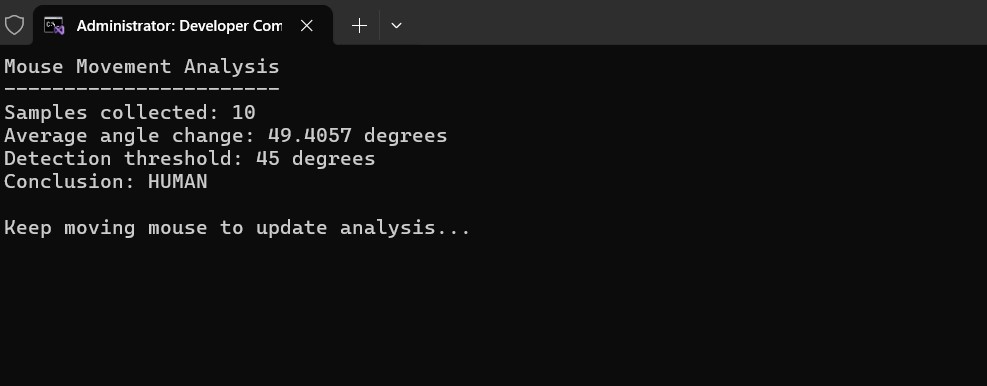
Human Detection Output
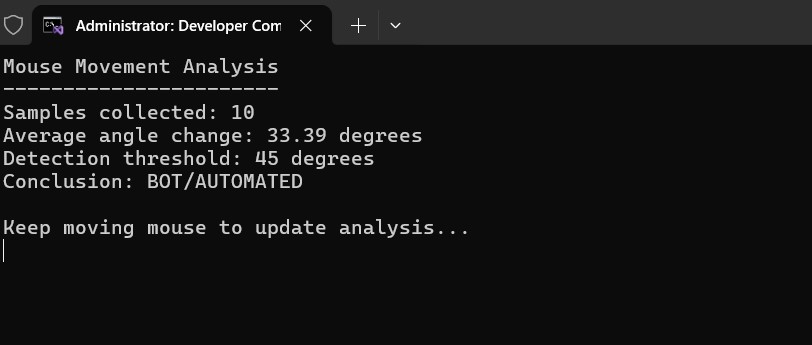
Bot Detection Output
The program is missing a lot of mathematical and execution logic but I am demonstrating this as a PoC. An enhanced version of this can be used to detect human activity and BOT activity with high accuracy to escape sandbox.